There is a quiet epidemic in the Rust CLI ecosystem: libraries that produce help text so bland it could be a tax form, error messages so flat they could slide under a door, and documentation output so unstyled it actively discourages reading. Meanwhile, every modern terminal emulator supports bold, italic, colour, and Unicode box-drawing characters. The gap between what terminals can display and what most CLI tools choose to display is roughly the width of the Grand Canyon.
Marcli closes that gap. It takes CommonMark Markdown and renders it as richly styled ANSI terminal output. You write Markdown. Your users see beautifully formatted text in their terminal. That is the entire proposition, and it is exactly enough.
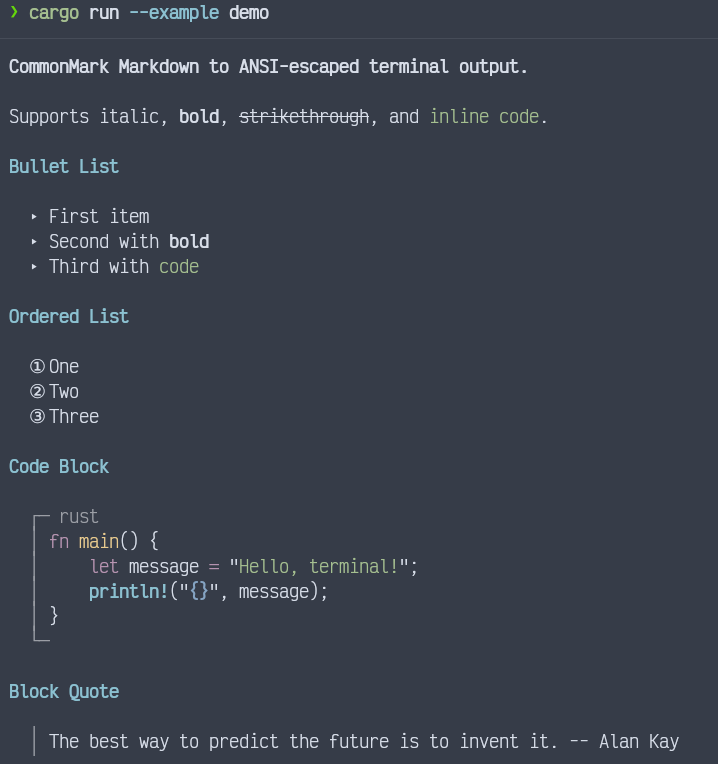
What It Does
Marcli parses Markdown via comrak (the same parser that powers GitHub’s rendering) and walks the AST to produce ANSI escape sequences for every supported element. Syntax highlighting for fenced code blocks comes from syntect using the same grammar definitions that power Sublime Text. No shelling out to Pygments, no runtime downloads, no configuration ceremony.
One function call:
let output = marcli::render("# Hello\n\nSome **bold** text.", &Default::default());
println!("{}", output);
That is the entire API surface for the common case. The render function takes a Markdown string and a RenderOptions struct, and returns a String with embedded ANSI escape sequences. No builder pattern with seventeen chained methods. No trait you need to implement first. No async runtime lurking in the dependency tree.
Supported Elements
Marcli handles the full CommonMark specification plus several extensions:
- Headings—h1 renders as bold yellow, h2 as bold cyan, h3 and below as bold white. Three levels of visual hierarchy without any configuration.
- Inline formatting—bold, italic, strikethrough, and inline code, each with its own ANSI style.
- Bullet lists—rendered with triangle markers (▸) instead of the usual ASCII hyphen. Small detail, large readability improvement.
- Ordered lists—use circled number glyphs (①, ②, ③, …) up to twenty items. After that, it falls back to parenthesised numbers. Nobody has complained about the limit.
- Fenced code blocks—framed with Unicode box-drawing characters and a language header. When a language identifier is present, syntax highlighting is applied automatically.
- Block quotes—prefixed with a dim vertical bar, visually distinct from surrounding text without screaming for attention.
- Tables—full box-drawing borders with proper column alignment (left, right, centre). Header rows are bolded.
- Task lists—checkbox markers (☑ / ☐) for checked and unchecked items.
- Thematic breaks—rendered as a dim horizontal rule using the box-drawing horizontal character.
- Links—the link text appears underlined in blue, followed by the URL in dimmed text.
- Images—displayed as bracketed alt text with the URL, since terminals are not, despite our best efforts, image viewers.
This is not a subset. This is everything you would reasonably want to render in a terminal, and nothing you would not.
Syntax Highlighting That Works Without Configuration
Fenced code blocks tagged with a language identifier are automatically highlighted using syntect’s built-in grammar definitions. Rust, Python, Elixir, JavaScript, Go, C, SQL, TOML, YAML, Markdown itself—if syntect knows the language, Marcli highlights it.
fn main() {
    let md = "```rust\nfn greet(name: &str) {\n    println!(\"Hello, {}!\", name);\n}\n```";
    let output = marcli::render(md, &Default::default());
    println!("{}", output);
}
Keywords get one colour, strings another, comments are dimmed and italicised, function names stand out. The mapping from syntect’s TextMate-style scope selectors to ANSI escape sequences is built in and covers every major token category: keywords, strings, numbers, comments, operators, names, storage modifiers, entity names, support macros, constants, variables, and generic diff markers. Each category has a sensible default, and each one can be overridden.
When the specified language has no matching syntax definition, the block renders as plain styled text inside the same box-drawing frame. No crash, no warning, no degraded experience—just code without colours.
Syntax highlighting can be turned off entirely:
let mut theme = marcli::Theme::default();
theme.syntax_highlight = false;
let opts = marcli::RenderOptions { theme, ..Default::default() };
Full Theming via TOML
Every visual aspect of Marcli’s output is controlled by the Theme struct: heading colours, list markers, code block borders, table characters, syntax highlighting token styles, thematic break width, block quote prefix—everything. The defaults are sensible, but if you need corporate colours or a high-contrast accessible theme, you override exactly the fields you care about.
Themes can be loaded from TOML files:
let theme = marcli::Theme::load(".marcli.toml").unwrap_or_default();
let opts = marcli::RenderOptions { theme, ..Default::default() };
let output = marcli::render(markdown, &opts);
A partial TOML file overrides only the specified fields; everything else stays at the default. Unknown keys are silently ignored, so themes remain forward-compatible as new fields are added.
The theming system is not an afterthought bolted on with feature flags. It is the architecture. The rendering engine does not contain a single hardcoded ANSI sequence—every style is read from the Theme struct at render time. This means you can produce completely unstyled output by setting all style fields to empty strings, or produce output for a specific terminal’s capabilities by adjusting only the sequences that matter.
CRLF Support for xterm.js and Web Terminals
If your CLI tool also renders in a web-based terminal (xterm.js, for instance,) line endings matter. Marcli lets you specify the newline sequence:
let opts = marcli::RenderOptions {
    newline: "\r\n".into(,)
    ..Default::default()
};
let output = marcli::render(markdown, &opts);
Every internal line break—between list items, inside code blocks, between paragraphs—uses the configured sequence. No post-processing regex. No “replace \n with \r\n and hope nothing breaks.” It is correct by construction.
Stripping ANSI for Plain Text
Sometimes you need the structured rendering without the colours—for logging, for piping to a file, for accessibility tools that choke on escape sequences. The escape_sequences option handles this:
let opts = marcli::RenderOptions {
    escape_sequences: false,
    ..Default::default()
};
let output = marcli::render(markdown, &opts);
// output contains structured text with markers and indentation, but no ANSI codes
Marcli also exposes strip_ansi as a public function if you need to strip escape sequences from arbitrary text:
let plain = marcli::strip_ansi(some_ansi_string);
The Dependency Story
Marcli depends on six crates: comrak (Markdown parsing,) syntect (syntax highlighting,) serde and toml (theme serialisation,) regex (ANSI stripping,) and once_cell (lazy statics). All with default features disabled where possible. No tokio. No hyper. No tower. No serde_json. No feature flag combinatorial explosion. No proc macros beyond what serde requires.
The dependency tree is narrow by design. A CLI tool that adds Marcli to render its --help output or its error diagnostics does not suddenly inherit an HTTP client and a TLS stack.
Why Marcli Instead of the Alternatives
The Rust ecosystem has several approaches to styled terminal output, and each solves a different problem:
Raw ANSI crate (e.g., colored, owo-colors, ansi_term)—These are paint brushes. They let you colour individual strings. They do not parse structure, do not handle lists, do not render tables, do not highlight code. If your content is already structured, you still have to write all the formatting logic yourself. Marcli takes unstructured Markdown and produces fully structured terminal output. Different layer entirely.
TUI frameworks (e.g., ratatui, tui-rs)—These are full terminal UI toolkits. They manage layout, widgets, event loops, alternate screen buffers. If you are building an interactive application, they are excellent. If you need to print a styled help message and exit, they are a sledgehammer for a thumbtack. Marcli is the thumbtack-sized tool.
termimad—The closest alternative. Also renders Markdown in the terminal. But termimad uses its own Markdown parser (not CommonMark-compliant,) has a different (and more opaque) theming model, and does not provide syntect-based syntax highlighting. Marcli uses comrak for parsing (GitHub-compatible CommonMark,) syntect for highlighting (Sublime Text grammars,) and exposes every visual parameter via a flat, serialisable Theme struct. If you value spec compliance and configurability, the choice is straightforward.
mdcat—A standalone command-line tool, not a library. You cannot embed it in your Rust binary and call render(). It shells out or requires its own binary on the user’s machine. Marcli is a library: add it to Cargo.toml, call a function, get a string.
The Argument for Lightweight
Every Rust CLI library that communicates with humans faces the same question: how do you present structured text? The answer is almost always one of: ⓐ dump plain text and hope the user reads it, ⓑ hand-roll ANSI formatting with dozens of format! calls and hardcoded escape sequences, or ⓒ pull in a framework that weighs more than the application itself.
Marcli offers option ⓓ : write your messages, help text, error explanations, changelogs, and diagnostics in Markdown—a format your team already knows, that your editor already highlights, that your documentation pipeline already renders—and let a single function call turn it into terminal output that people want to read.
The cost is one function call and six transitive dependencies. The benefit is that every piece of text your CLI emits can be bold, italic, syntax-highlighted, bulleted, tabled, and quoted, with full theming support and zero manual ANSI wrangling.
Your terminal deserves better than println!. Marcli is how you give it better.
Links
- Repository: github.com/Oeditus/marcli-rust
- Documentation: docs.rs/marcli
- Crate: crates.io/crates/marcli